Cursor, a pile of repos, and two strange fights to make semantic search work
TL;DR #
Two Cursor bugs bite when you nest git repos under a gitignored parent and open them in one window:
- Semantic search returns nothing when the
.code-workspacelists the root folder (.) alongside its own nested subfolders. - The agent’s Grep and Glob tools go blind on the nested repos. They build their search off the git tree and honor
.gitignoredirectly, and the.cursorignore/.aiignorere-includes that are supposed to override that don’t reliably apply.
Each has a per-bug workaround : drop the . root; maintain .ignore/.cursorignore re-includes. But both are fragile, and the grep/glob one keeps regressing between Cursor releases. What sidesteps both for good is a flat layout where the repos aren’t gitignored from above. Then there’s nothing for either bug to bite, regardless of Cursor version.
Setup #
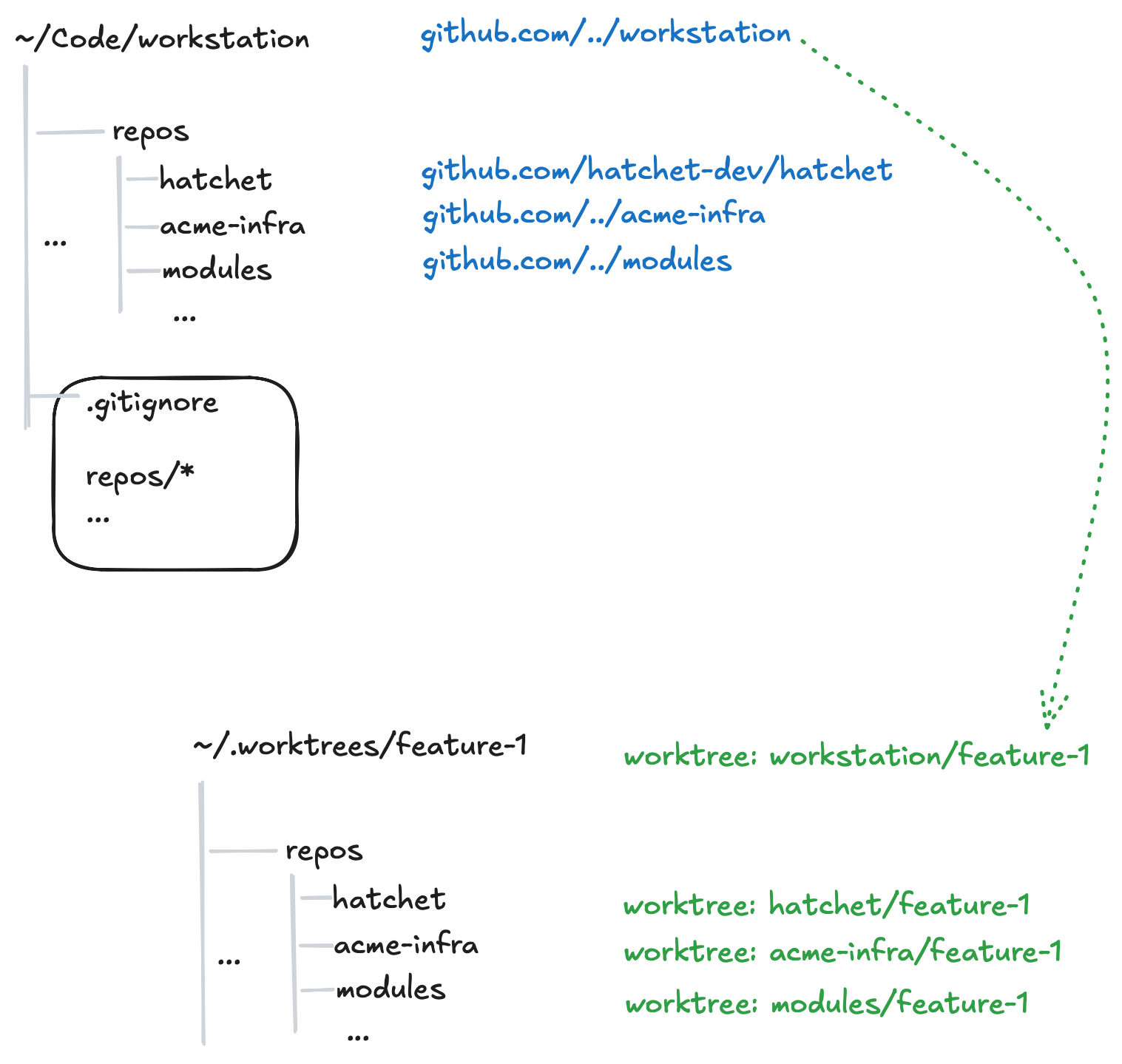
I work across multiple git repos from one “workstation” repo. Each repo lives under repos/<slug> as a clone, and repos/* is gitignored so the workstation tree stays clean. I work almost entirely in the IDE. I used to be a JetBrains diehard, but nowadays it’s mostly Cursor.
I have multiple “projects” running in parallel: testing a change or a PR; working on a long-running “moon shot”; a quick fix for a customer bug; and so on. To make that manageable, I’ve written some local scripts to git worktree the root workstation repo together with its subrepos. This way, if a feature needs a multi-repo change, I’m covered.
With agentic coding, I want the agents to operate effectively against this multi-repo setup. A few Cursor tools need to work correctly in my worktrees for that to be efficient: Grep and Glob, semantic search, and Source Control (the git client in the UI). With Cursor, it’s sadly more complex than it should be. This writes it down for my future self, and for anyone with a similar setup, to save the research effort (and LLM tokens!).
Why semantic search, specifically #
Semantic search is one of the headline Cursor features, and a differentiator from Claude Code. They make a big deal of it — see Improving agent with semantic search — claiming it improves the model’s results on their benchmarks by up to 23.5% (versus conventional tools like grep/rg). The search runs on turbopuffer, and both companies market the partnership. This is probably one of the reasons you’re a Cursor customer.
Fight one: 100% indexed, zero results #
To work across the repos in one Cursor window, I had a multi-root workspace <feature-name>.code-workspace:
{
  "folders": [
    { "path": "." },
    { "path": "repos/hatchet" },
    { "path": "repos/acme-infra" }
  ],
  "settings": { "files.exclude": { "repos": true } }
}
Navigation and the per-repo git client worked, but semantic search did not.
The funny thing about the current generation of models is that they are very resourceful, and they can work around problems. E.g. if the semantic search returns no results for them, they will reach out for grep. This means it’s hard to notice the degradation.
In my case, I noticed a few times in the agent thinking traces something to the effect of “semantic search returned no results, using grep instead”. I verified this by asking the agent to answer some codebase questions using semantic search only.
To rule out the obvious: indexing was on, and Cursor reported a few thousand indexed files.
Single folder workspace #
This isn’t documented well (at all) in their official docs, but trawling through the Cursor forums I found reports that listing the workspace root in folders next to its own subfolders breaks semantic search (see use a single-root workspace, a workspace with multiple folders for a monorepo … either gets no results or results from folders that are in ROOT, and several other threads).
In my case the list of workspace folders contains the root . and all the repos, like ./repos/acme-infra and ./repos/hatchet.
The first try, then, was a single-root workspace: "folders": [{ "path": "." }]. This fixes semantic search but breaks the git client in the UI. With one root at the workstation and the repos under a gitignored path, Cursor doesn’t report the repos as git roots — you see only the workstation repo and nothing else. There’s a git.scanRepositories setting, but it doesn’t help either. This lines up with microsoft/vscode#96372.
So far, we have two shapes, each broken in some way:
- workstation root + repos → Source Control works, semantic search empty
- single root, repos nested → search works, Source Control shows one repo
The Cursor workspace shape that works #
I ended up dropping the workstation root from the worktrees:
{
  "folders": [
    { "path": "repos/hatchet" },
    { "path": "repos/acme-infra" }
  ]
}
No ., and the result:
- Each folder is its own git repo, and shows in Source Control with its branch and status.
- No parent root overlaps its children, which works around the Cursor semantic search limitation.
The cost is that the workstation’s own files aren’t a folder in this workspace. That’s an acceptable tradeoff for me: the workstation changes rarely, and I can work on it from the main checkout.
Fight two: the agent’s Grep and Glob go blind #
The second bug is sneakier, because the command-line tools and the editor’s own search keep working while the agent’s tools quietly stop.
Search tools honor .gitignore — they won’t descend into ignored paths. For me, repos/ is in .gitignore, so out of the box anything that respects .gitignore skips it when searching from the root. The goal is to re-include the repos for search while leaving them out of version control, and to do it without dragging in node_modules and build output.
.gitignore keeps the repos out of version control:
repos/*
.ignore re-includes them for ripgrep on the command line. One line per repo, directory only:
# .ignore
!repos/hatchet/
!repos/acme-infra/
ripgrep applies the directory re-include and then walks into it, honoring each repo’s own nested .gitignore. So node_modules, build output, and the rest stay out on their own, because the repo already ignores them. The rg 🐐 binary in a terminal finds everything.
.cursorignore and .aiignore are supposed to do the same for Cursor’s indexer and ⌘⇧F. Re-including the repos and then denylisting the usual generated directories gets ⌘⇧F and the indexer working:
# .cursorignore, .aiignore
# Re-include cloned repos (still gitignored via repos/* in .gitignore).
!repos/hatchet/
!repos/hatchet/**
!repos/acme-infra/
!repos/acme-infra/**

# denylist generated output, re-excluded after the re-includes
**/node_modules/
**/.terraform/
**/dist/
**/.next/
**/__pycache__/
So three files that look like copies of each other have to diverge: .ignore stays directory-only and leans on each nested .gitignore; .cursorignore and .aiignore need the explicit /** plus a hand-maintained denylist.
And here is the part the article used to claim was the happy ending — with that in place, Grep, Glob, and the indexer all see the repos. That’s the claim that broke. The terminal rg finds the repos, ⌘⇧F finds them, the indexer finds them, but the agent’s Grep and Glob tools return zero results for anything inside repos/. The agent silently falls back to other tools, so you don’t notice until you go looking.
This is acknowledged by Cursor. Two threads pin down why:
- The agent’s Grep and Glob build their search off the git tree. See this thread: “Agent Grep and Glob build their search off the git tree, and nested git repos that aren’t registered as submodules with no entry in
.gitmodulesend up invisible to these tools”. - Even setting nesting aside, the re-includes don’t take precedence the way you’d expect. Here they’ve confirmed “the
.cursorignoreallowlist / negation patterns were not taking precedence over.gitignorefor these tools the way they should”, and that a fix was merged but “not yet in the public release builds … should make its way into 3.2.x release builds”. It’s not working for me as of 2026-06-17 build.
On a separate thread they’ve explained that “the agent’s rg/glob tools respect .gitignore directly, and .cursorignore negation patterns may not fully override that for these terminal-based tools” then later closed it with “This issue has been fixed in a recent Cursor update”. But it seems like this regressed again.
What finally worked: stop nesting the repos #
Both bugs share a root cause: the repos live inside a gitignored parent, and Cursor’s git-tree-based tools take that nesting as a signal to skip them. So I stopped nesting.
In the flat layout, each repo is a sibling directory that nothing upstream gitignores, and the .code-workspace lists them directly:
{
  "folders": [
    { "path": "hatchet" },
    { "path": "acme-infra" }
  ],
  "settings": { "window.title": "Feature A" }
}
- No
.root overlapping its children, so semantic search works (bug one). - No gitignored parent, so the agent’s Grep and Glob have nothing to skip — and no
.ignore/.cursorignorere-includes are needed at all (bug two). The whole apparatus from fight two disappears. - Each folder is its own git root, so Source Control lists them separately, branch and status and all.
The nice thing about this, is that you’re not dependent on regresessions on temperamental workaround.
Check your own setup #
Given fast they move, it’s good to be sure the tools work as expected. If you have a similar pile of repos, here’s a quick way to tell whether all the paths actually work before you trust them in anger.
Simply ask the agent to verify separately if semantic search tool, grep/glob tools work in this workspace. The SOTA models are smart enough to figure what you ask about.
Two bonus checks in the UI:
- ⌘⇧F (Find in Files): search for an identifier you know.
- Source Control: each repo should appear as its own root, and a trivial edit should show up under the right one.
What to take from this #
- Two Cursor bugs surface when you nest git repos under a gitignored parent: semantic search goes empty when the
.code-workspacelists the root.next to its own subfolders, and the agent’s Grep and Glob go blind on the nested repos because they build off the git tree and honor.gitignoreover the.cursorignorere-includes. - Each has a workaround — drop the
.root; maintain divergent.ignoreand.cursorignorere-includes — but the grep/glob one is a moving target that tracks the Cursor version, not your config. - The durable fix is to not nest: it seems like this usecase is just not common enough for Cursor to test against.
Dear Cursor #
My favorite AI coding assistant at the moment, but please make the agent’s Grep and Glob see nested repos, and keep semantic search working in multi-folder workspaces. I’d rather not spend as much time configuring the editor as I did in my Emacs days!